2026 marks a historic turning point for Cambridge students worldwide. After decades of pen-and-paper exams, Cambridge Assessment International Education is rolling out its first digital exams, which change everything about how students prepare, sit, and succeed.
In this guide, we'll cover what Cambridge digital exams are, which subjects and regions are affected, how the exam platform works, the benefits of this exam, how you can prepare starting today, and a comparison vs Homeschool Asia’s test papers, including how Homeschool Asia's tools can give you a head start and a last-minute revision checklist.
What Are Cambridge Digital Exams? (And Why 2026 Is a Big Deal)
Cambridge Digital exams are modern, computer-based versions of traditional Cambridge assessments. This is one of the biggest changes in Cambridge's history. After years of research and pilot programs, Cambridge is officially transitioning from traditional paper-based exams to a computer-based format. Their long-term goal? To have 85% of high-stakes qualifications available digitally by 2033. 2026 is just the beginning.
The Shift from Paper to Screen: What Cambridge Is Changing
Cambridge is moving its traditional pen and paper exam format to a computer-based format. But let's be clear, this is not an online exam you take from home. Digital exams are still supervised, in person, and held at registered exam centres. The only difference is that instead of filling bubbles on a paper answer sheet, you'll be selecting answers on a screen.
This transition started as part of Cambridge's Early Adopter Programme (EAP), which launched in June 2026. Think of it as a controlled rollout. Cambridge is testing the waters with a limited set of subjects and regions before expanding globally.
Which Subjects and Qualifications Are Going Digital in 2026?
For the 2026 EAP, the following subjects are confirmed for digital delivery:
- IGCSE Biology (MCQ Paper 1)
- IGCSE Chemistry (MCQ Paper 1)
- IGCSE Physics (MCQ Paper 1)
- IGCSE Economics (MCQ Paper 1)
- IGCSE Accounting (MCQ Paper 1)
- AS Level English General Paper (Paper 1)
Important note: In this first phase, only the MCQ (Paper 1) formats are going digital. Written papers, practicals, and coursework components remain paper-based for now. More subjects will follow in subsequent years as Cambridge expands the programme.
Which Regions Are Included in the 2026 Early Adopter Programme?
The 2026 EAP is limited to specific regions: Europe, the Middle East, North Africa, and the United States. If you're sitting exams in these regions in 2026, you may be part of the first cohort of digital exam takers.
What About Asian Students? When Does the Digital Rollout Reach Asia?
If you're studying in Asia, here's the honest answer: Asia is not part of the 2026 EAP. The broader global rollout, which includes Asia, begins in June 2027. That means students in countries like Nepal, India, Singapore, Malaysia, and others will likely see digital exams from 2027 onward.
But here's the good news: starting your preparation now is still the smartest move you can make. The transition is coming, and students who begin practising on digital platforms today will have a significant advantage when the shift reaches Asia. Let's look at how these exams actually work so you know exactly what to expect.
How Do Cambridge digital exams work?
Understand the mechanics of the digital exam to feel confident about it. Here's a practical walkthrough of what happens on exam day.
The Cambridge Digital Exam Platform: Interface and Features Explained
Cambridge has developed a dedicated digital delivery platform (sometimes referred to as the Cambridge Exams Officer platform) that runs the entire exam experience. Here's what the screen looks like:
- Question panel on the left or centre of the screen, displaying one question at a time
- Answer options are clearly listed for MCQ selection
- Progress tracker showing how many questions you've completed and how many remain
- Navigation controls to move forward and backwards between questions
The platform is locked down and secure; there is no internet access, no ability to switch tabs, and no external applications running. Everything is controlled within the exam environment. If official previews or demo videos are available from Cambridge, your exam centre should be able to share them with registered students.
What Does a Digital Exam Look Like on Screen? (MCQ Format Walkthrough)
Here's what actually happens during a digital exam:
- You launch the exam on the designated computer at your exam centre
- A screen displays the exam instructions and rules
- Each MCQ appears one at a time (or in a scrollable list, depending on the subject)
- You click on your chosen answer — no bubble filling, no eraser marks, no smudges
- You can flag questions you're unsure about and return to them later
- Once you're satisfied, you submit your answers
The experience is designed to feel familiar to anyone who has used a computer for basic tasks. If you've ever taken an online quiz or practice test, you already have a head start.
Tools Available During the Exam: Highlighter, Notepad, and Navigation
One of the biggest advantages of digital exams is the built-in toolkit. Here's what you get:
- Text highlighter: Mark key parts of questions or passages. Unlike paper, highlights won't smudge or fade.
- Digital scratch notepad: A separate area for rough work, calculations, or notes. Your notes are kept separate from your answers.
- Question flagging: Mark questions you want to review later. The platform keeps track for you.
- Zoom function: Enlarge text or diagrams if needed.
Pro Tip: Practice using these tools before exam day. The more familiar you are with the digital interface, the less mental energy you'll spend on navigation during the actual exam.
How Long Are the Digital Exams and How Is Timing Managed on Screen?
The duration of digital MCQ papers varies by subject; you should verify the exact timing for your specific syllabus. However, here's what you can expect:
- A countdown timer is visible on screen throughout the exam
- The platform gives warnings, typically a 5-minute reminder before time runs out
- You can go back and change answers within the MCQ format before final submission
The timer is always visible, so there's no need to keep checking your watch. This is actually an advantage over paper exams, where you have to manage your own timing.
Benefits of Cambridge Digital Exams
Change can feel daunting, but the shift to digital brings real advantages that students should be excited about.
Instant, Clearer Results and Reduced Human Marking Error
One of the biggest benefits of digital MCQ exams is that they are auto-marked. This means:
- No risk of human marking error
- No misread handwriting
- No lost answer booklets
- Faster results processing compared to paper-based marking pipelines
For students, this means your grade reflects exactly what you answered, nothing more, nothing less. Results are processed faster, which means less waiting time after exam season.
A More Accessible and Inclusive Exam Experience
Digital exams open the door to better accessibility for all students:
- Adjustable font size for students who need larger text
- Screen zoom for detailed diagrams or small print
- Typed responses (in future written paper phases) remove handwriting legibility concerns
For students with certain learning differences or physical challenges that make handwriting difficult, digital exams can be genuinely transformative.
Environmentally Friendly: The Case for Going Paperless
Here's a benefit that's easy to overlook: digital exams eliminate millions of papers, answer booklets, and mark schemes per exam session. That's a significant environmental impact. While this isn't the main reason to celebrate digital exams, it's a nice bonus.
Benefits Specifically for Self-Studying and Homeschooled Students
This is where things get interesting for HomeSchool Asia's audience. Self-studying students are already accustomed to screen-based learning, reading notes on a laptop, watching video lessons, and taking online quizzes. This puts you at a natural advantage over traditional school students who are used to paper-based everything.
Platforms like HomeSchool Asia already simulate digital exam conditions through online mock exams and an online past paper question generator. When you practice on our platform, you're not just studying content, you're training your brain for the digital exam experience. Our users are better prepared for this shift than most school students, simply because screen-based learning is already part of their daily routine.
How to Prepare for Cambridge Digital Exams at Home
Preparation looks slightly different for digital exams compared to paper-based ones. Here's how to adapt your approach.
Setting Up Your Study Environment for Digital Exam Practice
To simulate exam centre conditions at home, set up your space thoughtfully:
- A quiet room with minimal distractions
- A proper desk and chair — not your bed or sofa
- A reliable laptop or desktop computer (not a phone or tablet)
- A mouse, if you prefer it over a trackpad (many students find it faster for MCQ selection)
- Good lighting to reduce screen glare
- Maintain good posture to avoid fatigue during longer practice sessions
The goal is to replicate the exam centre experience as closely as possible. The more your practice environment matches the real thing, the less disorienting exam day will feel.
Building Your Typing Speed and On-Screen Navigation Skills
For the 2026 phase (MCQ only), typing speed is less critical than mouse accuracy and screen navigation comfort. You need to be able to click the right answer quickly without hesitation.
However, for future phases that include written digital papers, typing speed will matter more. Start building that skill now. Free tools like Typing.com and Keybr can help you improve without any cost.
How to Adapt Your Revision Strategy from Paper-Based to Screen-Based Study
If you've been studying primarily with printed notes and paper past papers, it's time to shift:
- Read revision notes on screen instead of printing them
- Answer practice questions digitally rather than on paper
- Take timed digital mock exams to build screen stamina
- Be aware of eye fatigue — follow the 20 20 20 rule (every 20 minutes, look at something 20 feet away for 20 seconds)
- Take regular breaks between study sessions
The key is to make screen-based study your new normal. By the time exam day arrives, reading and answering on screen should feel completely natural.
Recommended Daily Practice Routine for Cambridge Digital Exam Readiness
Here's a simple framework you can adapt to your schedule:
- 20 minutes — Subject revision using digital notes or video lessons
- 1 timed digital MCQ session — Using a platform like HomeschoolAsia's Past Paper Question Generator
- 10 minutes — Review your answers and study your Diagnostic Report
- Repeat for each subject you're preparing for
This routine combines content revision with digital exam practice. Over time, you'll build both subject mastery and screen-based confidence.
Comparison: Cambridge Digital Exams vs HomeschoolAsia's Testpapers & Mock Exams
Let's be direct: the best way to prepare for a digital exam is to practice on a digital platform. Here's how HomeSchool Asia's tools stack up against the real Cambridge digital exam experience.
How HomeschoolAsia's Testpapers Mirror the Digital Exam Format
The parallels are striking:
- Both are screen-based
- Both use MCQ formats
- Both require you to select answers on screen
- Both operate under timed conditions
The cognitive experience, reading on screen, managing time, selecting answers, and reviewing flagged questions, is essentially identical. When you practice on HomeSchool Asia, you're not just studying content. You're training your brain for the exact format you'll face on exam day.
Key Similarities: Timed Conditions, MCQ Format, and Instant Feedback
Here's what makes HomeSchool Asia's Testpapers an ideal preparation tool:
| Feature | Cambridge Digital Exam | HomeSchool Asia’s Testpapers |
|---|---|---|
| Screen based | ✅ | ✅ |
| MCQ format | ✅ | ✅ |
| Timed conditions | ✅ | ✅ |
| Instant feedback | ❌ | ✅ (Diagnostic Report) |
| Wrong answer explanations (Instant Explanations) | ❌ | ✅ (Instant Explanations) |
| Topic-level weakness analysis | ❌ | ✅ (Diagnostic Report) |
Practising under timed conditions on screen is the single most effective way to prepare for Cambridge digital exams. And as the table shows, HomeSchool Asia goes further by giving you feedback that the real exam platform doesn't.
How to Use HomeSchool Asia's Mock Exams as a Digital Exam Simulator
Here's a step-by-step approach:
- Select your subject from the Mock Exam section
- A timer is set to match your actual exam duration
- Treat it like the real thing, no pausing, no distractions, no phone
Do this 2–3 times per week leading up to your exam, and you'll walk into the exam centre already familiar with the digital format.
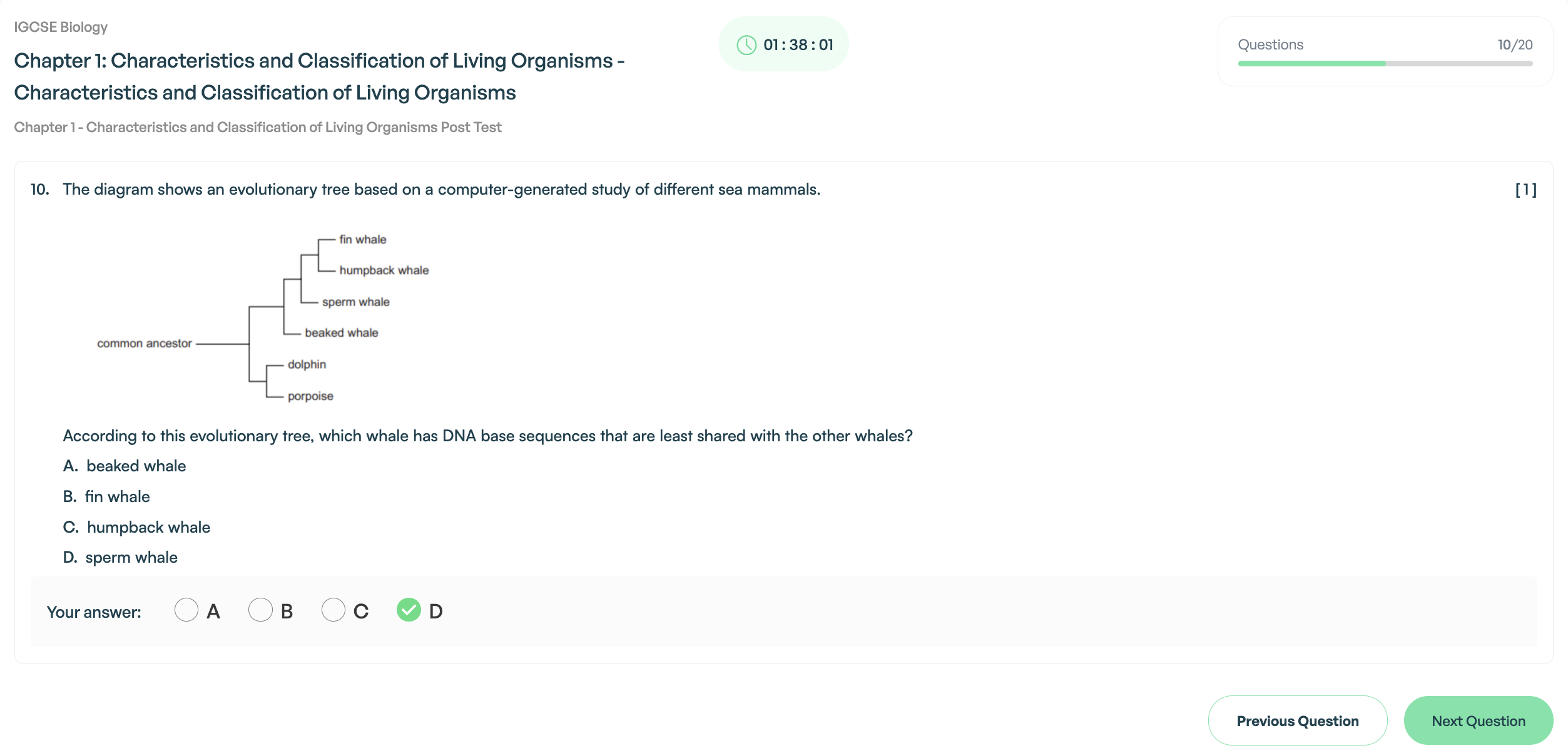
What HomeSchool Asia Offers That the Cambridge Platform Doesn't: Diagnostic Reports and Instant Explanations
Here's the key differentiator: the real Cambridge digital exam platform tells you your score. That's it.
HomeSchool Asia goes deeper:
- Diagnostic Reports show you exactly which topics you're weak in, broken down by chapter and concept.
- Instant Explanations tell you why an answer was wrong, not just which answer was right.
- Progress tracking shows how your scores improve over time.
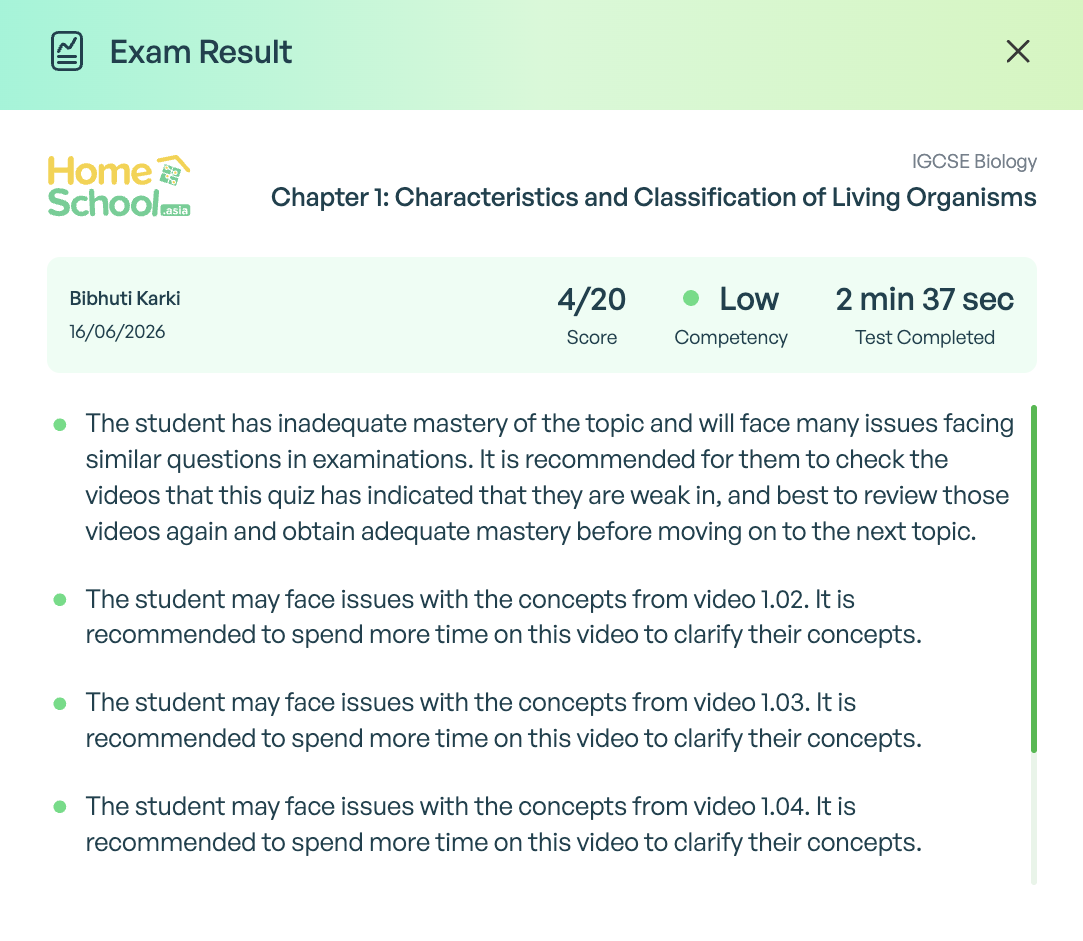
This means Home School Asia isn't just exam practice, it's exam improvement. Every session gives you data you can act on.
The Last Minute Revision Checklist for Cambridge Digital Exams (2026)
Bookmark this section. Come back to it as your exam approaches.
One Week Before: Content Revision and Platform Familiarisation
- ✅ Complete subject revision for all tested topics
- ✅ Take at least 2 full-time digital mock exams on HomeschoolAsia
- ✅ Generate Paper 1 Testpapers (Topical Past Paper Questions)
- ✅ Review your Diagnostic Reports and focus on weak areas
- ✅ Practice using digital tools (highlighter, notepad, flagging)
- ✅ Familiarise yourself with the on-screen timer and navigation
- ✅ Review key formulas, definitions, and concepts one more time
- ✅ Get comfortable with the screen-based MCQ format
One Day Before: Device Checks, Sleep, and Mental Preparation
- ✅ Confirm your exam time and location
- ✅ Check that your device is charged (if bringing your own)
- ✅ Test your mouse or keyboard if applicable
- ✅ Eat a good dinner, nothing too heavy or too light
- ✅ Avoid last-minute cramming, as it increases anxiety
- ✅ Prepare your ID and any required documents
- ✅ Set an alarm and plan your travel to the exam centre
- ✅ Get 8 hours of sleep
On Exam Day: What to Bring, What to Expect, and How to Stay Calm
- ✅ Arrive at least 30 minutes early
- ✅ Bring your ID and exam confirmation
- ✅ Listen carefully to the invigilator's instructions
- ✅ Use the digital notepad for rough work
- ✅ Flag uncertain questions and return to them later
- ✅ Keep an eye on the on-screen timer
- ✅ Don't panic if you're stuck, move on and come back
- ✅ Stay calm and trust your preparation
After the Exam: How to Review Your Performance and Prepare for the Next Paper
- ✅ Avoid post-exam comparisons with peers, they're usually stressful
- ✅ Note down topics that felt uncertain while they're fresh in your mind
- ✅ Use HomeSchool Asia's Diagnostic Reports to identify remaining gaps
- ✅ Begin light revision for your next paper within 24 hours
- ✅ Take a short break, you've earned it
Conclusion
Cambridge digital exams are coming, and the shift is inevitable. Whether you're sitting exams in 2026 as part of the Early Adopter Programme or preparing for the 2027 global rollout, the message is the same: start preparing now. Students who practice on digital platforms, who build screen-based study habits, take timed digital mock exams, and use diagnostic feedback to improve, will have a significant advantage when exam day arrives.
Frequently Asked Questions
Are Cambridge Digital Exams Available in Asia in 2026?
No. The 2026 Early Adopter Programme covers Europe, the Middle East, North Africa, and the United States. Asia is included in the broader global rollout starting from June 2027. Students in Asia should begin preparing now to stay ahead.
Which IGCSE and A Level Subjects Are Going Digital First?
Six subjects are confirmed for the 2026 EAP: IGCSE Biology, Chemistry, Physics, Economics, and Accounting (MCQ papers only), plus AS Level English General Paper. These are MCQ (Paper 1) formats only in the first phase.
Is the Digital Exam Harder Than the Paper Exam?
No. The content and difficulty level remain exactly the same. The only change is the medium — from paper to screen. Students who practice on digital platforms beforehand typically find the transition comfortable and sometimes even easier.
What Device Do I Need for the Cambridge Digital Exam?
Exams are taken on Cambridge-approved computers at registered exam centres. Students do not need to bring their own device. However, practising on a laptop or desktop at home is strongly recommended to build familiarity with the screen-based format.
What Happens If My Computer Crashes During the Exam?
Invigilators are trained to handle technical issues. Cambridge's platform saves your progress automatically. If something goes wrong, raise your hand immediately and do not attempt to fix the device yourself.
Will My Handwriting Still Be Assessed in Any Part of the Digital Exam?
For the 2026 phase (MCQ papers only), no handwriting is required. Future phases may include typed extended response papers, but handwriting assessment will not apply to digital exams.
Can I Practice on the Cambridge Digital Exam Platform Before the Real Exam?
Cambridge may offer a demo or familiarisation tool for registered students, check with your exam centre. In the meantime, practicing on HomeschoolAsia's timed digital test papers is the most effective way to simulate the experience.